


mySudokuEngine, Free Sudoku Software
-- PLAYING SUDOKU - Help P2 --
=== COME HOW TO INSERT SYMBOLS INTO THE GRID ===
__ 1 __
Select the box with the mouse (1 Left click)
OR
Use the keyboard cursor keys
__ 2 __
Press the key corresponding to the symbol you want to insert on the keyboard
To delete a symbol already inserted, press the [SPACE BAR]
OR
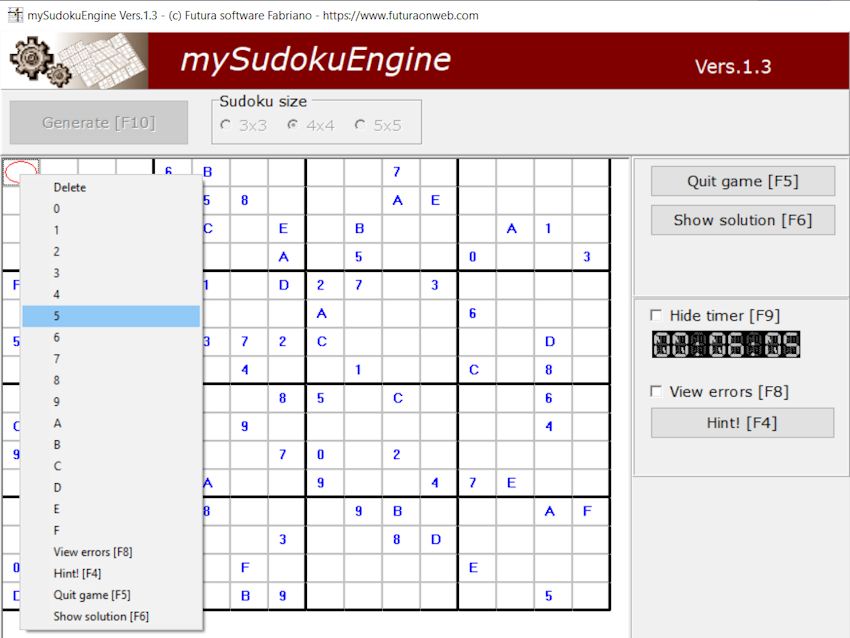
Right-click on the box,
to open the selection menu as shown in the figure
=== HOW TO PLAY ===
All the boxes in the grid must be filled following these rules
__ 1 __
The symbols allowed for each size are:
|3x3| 1-2-3-4-5-6-7-8-9
|4x4| 0-1-2-3-4-5-6-7-8-9-A-B-C-D-E-F
|5x5| A-B-C-D-E-F-G-H-I-J-K-L-M-N-O-P-Q-R-S-T-U-V-W-X-Y
__ 2 __
Each symbol must appear at least once and only once in each row,
in each column, and in each 3x3, 4x4, or 5x5 box depending on the chosen size
=== FEATURES ACTIVE AT THIS STAGE ===
TO QUIT THE GAME
(to change Sudoku puzzles or close the program)
Click the [Quit Game] button or press the [F5] function key
TO VIEW THE SOLUTION
Click the [Show Solution] button or press the [F6] function key
TO RETURN TO VIEWING THE GAME GRID
(from the solution view)
Click the [Show Game] button or press the [F6] function key
TO VIEW ERRORS
The program can highlight errors in the grid,
to activate/deactivate the control, press the function key [F8] or click
with the mouse in the box [ ] to the left of the word 'View errors'
TO HIDE/SHOW THE TIMER
Press the function key [F9] or click with the mouse in the box [ ]
above the timer itself
TO GET A HINT
Click the [Hint!] button or press the function key [F4]

